¶ Server
This page is dedicated to the Server tab of VH
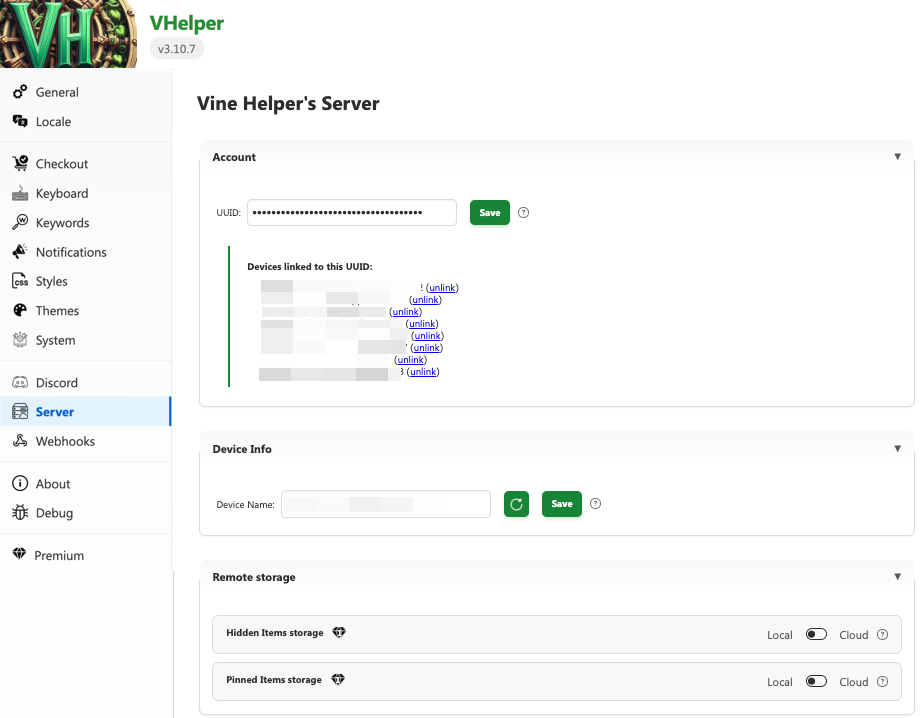
¶ UUID
This is a random identification number generated the first time you launched VH. It serves to identify you as a user while preserving your anonymity. If you are using multiple devices, you can have all of them using the same UUID. This is especially helpful if you unlocked the premium option to remote store your hidden and pinned items so those lists are now shared across devices. To do so, copy and paste the UUID from one extension to another.
The UUID needs to be generated & validated by the server, you cannot put your own made-up UUID.
¶ Device name
By default, devices (each installation) is given a random name. You can change that name so long as it's at least 15 characters long. When linking multiple devices under one UUID, this is an easy way to see if the linking has worked as you should see all your devices listed.
¶ (premium feature) Hidden item cloud storage
If you are a Patreon subscriber, VH can store your list of hidden items remotely. This has many benefits:
- Allow you to keep a smaller list locally, which will speed up the loading time of VH on every pages
- Have an unlimited amount of hidden items.
- Share your hidden list across multiple devices.
The reason it is called Hybrid Cloud is because VH always keep a local copy of your hidden files and process both the instruction received from the server and default to the local list if the remote server does not know the item from the hidden list.
Furthermore, should you deactivate remote storage (if you stop your premium subscription), you still have most of your recent items stored locally.
¶ (premium feature) Pinned list cloud storage
Similar to the hidden items, you can toggle if you want to store your pinned items locally or on the cloud. Note that it is truly a toggle and there is no hybrid mode. Once you switch to cloud storage, your local pinned items will be ignored and everything from that point on will only be read from the cloud. Technically, your local storage will still be updated in case you would be to stop your subscription.