¶ Ultraviner 26.11.34
¶ New
- GIFs in chat: Tenor, Klipy and Discord GIF links now play right in the chat instead of showing a link with a small preview card. Works on older messages too.
¶ Changes
- Sidebar buttons above the home bar: On iPad, the bottom sidebar buttons (Settings and the others) no longer sit on the home bar, so tapping them won't send you to the home screen. The product details view got the same space at the bottom.
- Bigger sidebar buttons: On touch screens, sidebar buttons are never smaller than a comfortable tap size. If they don't all fit, the list scrolls.
- Even sidebar: All sidebar buttons (top, list and bottom) now grow together with the screen height and stay the same size, with no odd gap under the last button.
- Scrollbars: On iOS, the sidebar and the queue bar show a thin overlay scrollbar again while you scroll.
¶ Fixes
- Tenor links: Google shut down the Tenor API, which broke GIF conversion in chat. Tenor links work again.
- Scroll arrows: The arrows on the sidebar and the bars no longer overshoot on iPad.
- Sidebar resizing: Sidebar buttons no longer jump in size when you resize the window past a certain height.
- Double line: Fixed a double border between the sidebar list and the Full screen button.
¶ Android app 6.1.1
¶ New
- Wear OS watches: Alerts show on your watch with Order and View buttons. Order from the watch places the order even while your phone is locked, and you'll see the result when you open the app.
¶ iOS app 7.1.3
¶ Changes
- New Dynamic Island look. The compact Dynamic Island shows the last hour of activity as small graphs on each side of the camera, in each queue's color.
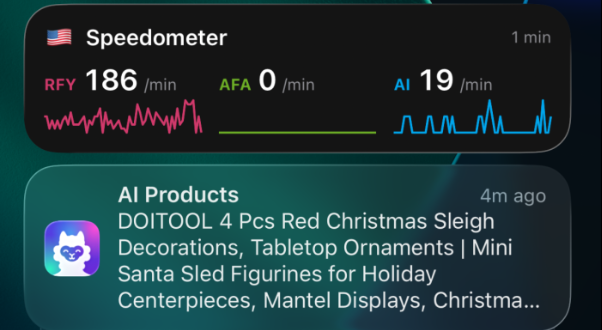
- Speedometer on the Lock Screen and in Notification Center now shows the Ultraviner logo instead of a speed icon.
¶ Fixes
- Fixed sound alerts interrupting music/audiobooks.
- Storage tweaks to prevent app from factory resetting by itself.
15 November 2026
¶ Ultraviner 26.11.31
¶ Changes
- Auto refresh now pauses correctly in the background on iOS and Android: When you minimize the iOS or Android app, auto refresh pauses until you open the app again so it doesn't show Amazon request errors. Alerts keep coming in as usual when configured to receive push notifications.
- Anonymous Orders removed: The Anonymous Orders option is no longer in Settings > Account as the setting was confusing, only used by less than 4% of the users and all orders are already anonymous by nature.
- Drag handles: The ⠿ handle used to reorder rules, screens and queues now has a border, so it's easier to see.
- Hivemind network: The algorithm has been imporoved to detect and alert produts faster.
- Tap to open: Tapping an alert notification now opens the product, same as the View button.
- One Notification per item: When several items drop at once, each gets its own notification instead of one "Item and 4 others" summary, up to 10 every 10 seconds. You can review or swipe them away one by one, also from your watch.
¶ Fixes
- Error messages on Safari: When refreshing a queue or loading a product timed out, Safari showed an empty error. It now says the request timed out properly.
14 November 2026
¶ Ultraviner 26.11.28
¶ New
- Skin tone and undertone preferences: Go to Settings > Behavior > Variation Preferences and set your Skin Tone (Fair to Very Deep) and Undertone (Cool, Neutral, Warm, Olive, Peach). On face makeup like foundation, concealer, skin tint, BB/CC cream and powder, Ultraviner picks the closest shade for you. It understands shade names in all marketplace languages, names like Ivory or Caramel, and codes like
220Wor1C0. - Drag and drop to reorder: Grab the ⋮⋮ handle to reorder your rules, your screens, and the queues inside each screen on Customize Screens. Nothing moves until you let go. The arrows still work too.
- "Has Draft" tag (Ultimate): Saving a review as a draft now tags the product "Has Draft", so your drafts are easy to find.
¶ Changes
- RFY products in Bookmarks: You can't order these from the Bookmark queue anymore, the same as in Explore. Checkout and rocket order are turned off, and clicking the product opens its Amazon page.
- Dragging queue toggles: On the dashboard, the toggle you're dragging now has a dashed outline and the drop spot has a solid one. Both use your theme's alert color.
¶ Fixes
- Dashboard scrollbar on iPhone and iPad: The dashboard's horizontal scrollbar now sits above the home indicator, so dragging it no longer triggers the iOS swipe-up gesture.
13 November 2026
¶ Ultraviner 26.11.27, iOS App 7.1.0
¶ New
- iOS app 7.1.0 is approved at the App store with rule push notifications, rfy push notifications, live activity on the notification center, lock screen and Dynamic Island widgets.
¶ Fixes
- Rocket orders on Amazon India Business accounts: Rocket orders no longer get stuck on the address step for Amazon Business accounts in India. UV now finds the right "Deliver to this address" button. It uses your selected address first, or the first one listed if none is selected. It also handles Amazon's address confirmation pop-up.
- Alerts with several windows open: If you have UV open in more than one window and one of them has a product open, alerts no longer stop. Another window takes over sending them, so you won't miss any.
- Heatmap dragging on touch screens: Dragging along the queue heatmap to pick a page no longer swipes left or right to the next or previous page by mistake.
- View Reactions window: Pressing or dragging inside the reactions window no longer selects text by accident.
11 November 2026
¶ Ultraviner 26.11.26, iOS App 7.1.0 (Pending Review), Android App 6.0.13
Push notifications are here! You can now get notifications on your phone, even when the app is closed. Open the app and allow notifications. No webhooks are needed for alerts.
¶ New
- Alert rule notifications (Turbo and Ultimate): Tap the new bell on any alert rule to get a push when it matches. You can turn it on from your computer too.
- New RFY item notifications (Ultimate): Turn this on in Settings > Notifications to get a push when a device you have running finds new RFY items. This one requires a device to be running.
- Notification details: Notifications show the rule name and product title. Rules marked Blur keep the rule name and product title off your lock screen.
- Rocket order from notifications: Order an item straight from its push notification.
- Push on each phone: To turn off push on one phone, go to Behavior > Mobile App and turn off "Push notifications on this device".
- Live speedometer: See the speedometer in a home screen widget, on your lock screen and in the Dynamic Island, updated every minute. Turn on "Live speedometer" in Behavior > Mobile App. Keep push notifications on so it stays current while the app is closed.
- Top bar on iPad: The app now has the top bar from the desktop app, with Infinite Mode, mute, country and navigation buttons. You can hide it in Behavior > Mobile App.
- Page zoom on iPad: New page zoom control in the top bar, which the app remembers between launches.
¶ Changes
- Instant reconnect: The app now reconnects instantly when you open it.
- Translations: The Rules and Notifications pages are now translated into all supported languages.
- Companion web app retired: The companion web app and its notifications are being retired. Phone notifications now come from the Ultraviner app.
- Drop-start notifications: These are turned off for now while we improve them.
9 November 2026
¶ Ultraviner 26.11.17, iOS App 7.0.6, Android App 6.0.10, Desktop Apps 5.0.31
¶ Changes
- Changed Log in functionality to open externally on ultraviner.com to simplify and avoid issues when signing in inside native apps.
- Fixed Log in with passkey and Log in with Google / Apple thru Reddit on iOS.
- Fixed daily reload inside desktop apps occasionally opening the wrong screen.
¶ Ultraviner 26.11.16
¶ New
- Ultraviner on the App Store: Ultraviner is now available on the App Store for iPhone and iPad, with optimizations for iPhone Duo. Android version is still on the works / approval state. This version has many improvements comparing to using on Safari / Orion.
- Add a reaction from the reactions row: Tap or click the smiley button after the last reaction to add your own directly from the row.
- See who reacted: Choose View reactions from the message menu to see every emoji reaction and who used it. Right-click the message on desktop or press and hold it on a touch screen to open the menu.
¶ Changes
- Reaction gestures on touch screens: Tap an existing reaction to add or remove yours. Press and hold it to see who reacted.
- Page heat map on touch screens: Slide your finger across the heat map below the paginator to see the page number and when it last refreshed. Lift your finger to open that page, or tap a page to jump to it directly.
- Queue layout on iPhone and iPad: The queues now end above the home indicator, keeping the paginator and heat map visible and accessible.
¶ Fixed
- Disappearing interface on iPhone and iPad: The top bar, sidebar icons, and chat header now stay visible when you dismiss the keyboard. You may notice a slight page shift as it closes.
- Chat emoji picker on iPhone and iPad: The emoji button now opens the picker on the first tap.
- Image zoom for product variations: Zooming now shows the high-resolution photo for the selected variation. High-resolution images load only when you zoom, so switching photos or variations uses less data.
¶ Ultraviner 26.11.15
This update brings a new checkout shortcut, image zoom, adjustable tile buttons and improvements to the new variation picker.
¶ New
- Checkout shortcut: Turn on “Checkout Shortcut” in a queue’s settings to add a cart button to the product tiles. It places the order through the regular checkout instead of Auto Checkout, and it can be used with or without the rocket button.
- Action buttons size: The new “Action Buttons Size” setting sets the size of the hide, bookmark and dismiss buttons on the product tiles.
- Variation picker mode: Choose how variations are picked:
- Toggle: The dropdown opens and closes the option buttons. (Default)
- Always open: The option buttons are always shown. (Great for big screens)
- Close on select: The option buttons close after you pick one.
- Text list: A plain list of every variation. (The old version)
- Image zoom on product view: Move your mouse over an image to zoom in on desktop, or pinch to zoom on touch screens. High definition images are loaded automatically when available during zoom.
- More bra cup sizes: More bra cup sizes are available in the variation preferences.
¶ Changes
- Rocket Order needs Auto Checkout: If Auto Checkout is off in Behavior Settings, the Rocket Order Shortcut is locked and the rocket button is hidden. Turn Auto Checkout back on and the rocket returns.
- Order button in the product view: It now shows a rocket instead of the coins icon. With Auto Checkout off, it shows a cart and the separate red checkout button is removed.
- Two double-click settings: “Double Click to Rocket” is split into “Double Click to Order with Rocket” and “Double Click to Order with Checkout”. Both are on by default.
- Hidden products ask first: Ordering a hidden product (shown with “Display Hidden Products”) now asks for confirmation.
- Order buttons size: “Rocket Button Size” is now “Order Buttons Size”. It sizes both the rocket and the cart, and large sizes no longer get cut off.
- Variation picker on top: It now pushes the content down the page instead of opening over it.
- Auto-expand variation picker: The variation picker automatically uses the available screen space when needed to show a long list of options.
- Product images: Better image scaling in the product view.
- Back button: It now says “Back”, and the button icons line up better on desktop and mobile.
- Alert sounds: Better at not playing twice when the same product shows up in more than one alert queue.
- Faster queue refresh: Vine pages are now read only as far as needed.
¶ Fixed
- Fixed the variation list thumbnails not loading on the Android app.
- Fixed the header scrolling on very small screens in the product view.
- Fixed a tooltip popping up on the Order button when opening a product.
- Possible fix for the toggle bar sometimes becoming invisible on iOS. Please tell us if you still see it.
6 November 2026
¶ Ultraviner 26.11.14
¶ New
- Share any product to chat: right-click a product in any queue, choose “Share to chat”, pick a room and add an optional comment. You need to open a chat queue at least once first so the app knows your rooms.
- Swag bag / loot posts, RFY summaries and product shares now show your name and picture on Discord instead of the Ultraviner bot. Your comment appears as your own message above the card.
- Edit or delete your shares straight from the UV chat window.
- Shared product cards show the product's country flag and queue (RFY / AFA / AI / Search), with two quick buttons: Search (opens a search for the product in your country, not shown for RFY items) and Explore (opens the product in a temporary Explore queue filtered to its queue type). Explore needs Turbo or Ultimate for your own country, and Ultimate for other countries and RFY items.
- New variation picker: options are grouped by type (size, color, etc.), only combinations that actually exist are shown, and color pictures appear on the options when Amazon has them. The panel stays open while you compare options, and the picture of the selected variation shows on the closed dropdown. If you'd rather skip the extra request to the product's Amazon page for these pictures, turn off “Variation Thumbnails” in the product details modal.
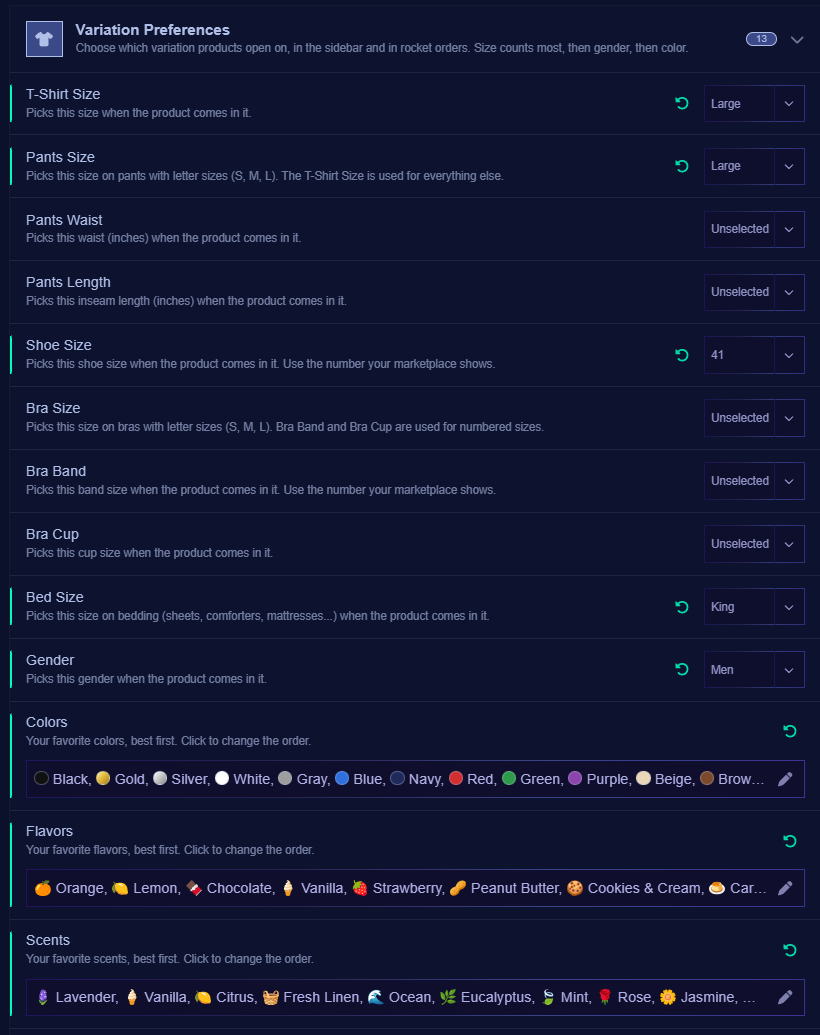
- New variation preferences in Behavior settings: set your preferred variations (like size or color) once, and Ultraviner pre-selects the matching variation when you open a product's details and when you rocket order, so you don't have to pick it every time.
- Resizable sidebar: drag the handle between the sidebar and the product details to make it wider or narrower. Works on touch screens too.
- New rocket animation for auto checkout, with a lighter overlay so you can still see the checkout page.
- New UV animation on the update/reload screen.
¶ Changes
- The variation selector is now at the bottom by default (Can be changed on behavior settings > Top/Bottom Variations Picker).
- Sizes are now sorted correctly (S, M, L, XL, and 8mm before 10mm) in every language. If you find sizes in the wrong order, please let us know.
- Switching variations no longer reloads the whole page. Details update in place, and Order, Cart and Share are blocked until the new variation has loaded so you can't order the wrong one.
- Several chat messages in a row from the same user are now merged into one message.
- The ETV on the order button is now off by default in countries that don't have ETV.
¶ Fixed
- Fixed the animation flashing on Android while updating.
- Fixed the order button's tooltip popping up every time you opened a product.
5 November 2026
¶ Ultraviner 26.11.8
This update brings major improvements to chat queues and HEIC pictures upload inside reviews.
¶ New
- HEIC pictures in reviews (Ultimate): Add Apple HEIC pictures directly in the review writer. They are automatically converted to JPG.
- Chat queue context menu: Right-click a message on desktop or long-press on mobile to reply, react, copy its text, report it, or block its author.
- Hover toolbar: Hover over a message on desktop to highlight it and access quick reaction and reply buttons. Your own messages also show edit and delete buttons.
- Replies: Reply to a specific message, with a preview of the original displayed above your reply. Discord also shows a “Replying to” link.
- Reactions: React with standard emoji or custom emoji from our Amazon Vine server. Including animated emojis. Click an existing reaction to add or remove yours.
- Edit and delete: Edit or delete your own messages sent from Ultraviner, with changes reflected on Discord. Edited messages display an “(edited)” label.
- Image uploads: Send a picture with an optional message using the new + button, or paste it into the message field. Photos are resized and metadata, including location, is removed before upload. HEIC uploads require Ultimate.
- Emoji picker: Add emoji to your messages. On desktop, custom Amazon Vine emoji appear as images in the message field.
- Report messages: Send a message to the moderators for review, along with your reason for reporting it.
- Block users: Hide someone’s messages from your view. Your blocked users list syncs across devices, and you can unblock people from “Blocked users” in the menu.
¶ Changes
- Message bar: The + button now contains GIFs and attachments, the emoji button sits inside the message field, and the send button appears only when there is something to send.
- Explore product limit: Explore now stops cleanly at 50,000 products, preventing errors or repeated results on the final page. Use filters to find older products.
- Webhooks after being offline: Missed alerts more than 10 minutes old no longer trigger webhooks when the app reopens. This prevents old alerts from triggering again when you open a second device. The cutoff also applies if you use only one device.
- Pending alerts on other UV screens: Alerts missed while the app was closed now remain pending until you switch to the relevant screen.
- Chat translations: The new chat menus and buttons are available in all supported languages.
¶ Fixed
- Queue type filters: Products that have appeared in multiple queues now appear under every applicable queue filter. Previously, only their most recent queue was used, so an RFY filter was not displaying a product that later moved to AI in the explore queue.
- Cleared searches returning: Clearing a search on page 1 and using the next-page shortcut no longer restores the old search. Page shortcuts now use your current search and filters.
- Delayed chat messages: Messages now appear immediately instead of sometimes remaining hidden until another message arrives.
- Failed chat messages: An error now appears when a message cannot be delivered.
- Chat reconnection: Chat now loads messages missed while your connection was interrupted.
- Emoji alignment: Emoji now align correctly with message text.
- Moderator badge: The MOD badge tooltip now reads “Moderator” instead of “Premium”.
- Feedback comment notifications: Clicking a notification while its thread is already open now loads the new comment without requiring you to leave and reopen the thread.
4 November 2026
¶ Ultraviner 26.11.5
¶ Changes
- Removed the full-screen button, shortcut, and gestures from the native iOS app due to the poor full-screen experience. (iOS app is being tested at https://testflight.apple.com/join/Wvrjuu77)
- Removed the “Open in new tab” context menu option from native iOS and Android apps.
- Translated the Reviews page tab names and the Account page into all supported languages.
¶ Fixed
- Fixed duplicate sounds playing for the same ASIN in quick succession.
- Improved Items per Hour: made hours with no data clickable, fixed colors flickering when switching queue types, corrected sparkle animations on iOS, and fixed incorrect results when switching to certain time zones.
- Fixed tooltips appearing behind the review writer modal.
3 November 2026
¶ Ultraviner 26.11.02
¶ New
- New button to delete account on the App Settings page.
- Added subscription management at ultraviner.com as well.
- New full UV demo page on ultraviner.com
¶ Changes
- Changed default dashboard view on fresh installs.
- Small improvements to items per hour graph.
- Translated welcome message to all languages.
- New users receive a batch of recent alerts in the alert queue.
- Engineering changes in preparation for the upcoming iOS and Android apps that are on the works.
¶ Fixed
- Adjusted labels on the Haul Reset Hour setting to be more user friendly.
- Fixed width of the search input inside RFY History.
2 November 2026
¶ Desktop App (Windows/Mac/Linux) 5.0.30
¶ New
- Added automatic updates. The first update requires a manual download and reinstall; subsequent updates will install automatically.
- Added support for Intel-based Macs.
- Added support for signing in with a passkey.
- Added automatic downloading and caching of custom alert sounds for future sessions.
- Added a search button and an address bar with a copy button to Amazon product windows. Search is also available with Ctrl+F.
- Added a search button to Ultraviner pages.
- Added a mute/unmute button to the top bar.
- Added a behavior setting to launch Ultraviner at startup.
- Added a behavior setting to open products in an external browser.
¶ Changes
- Bundled React files with the app to improve speed and reliability.
- Bundled Ultraviner's default alert sounds with the app.
- Updated Ultraviner icons.
- Added a Retina-resolution taskbar icon for mac.
- After an update, Ultraviner now reopens only dashboard windows.
¶ Fixed
- Fixed when trying to log in with an Amazon Account that is not part of vine.
29 October 2026
¶ Ultraviner 26.10.35
¶ New
- Added a behavior setting to switch carousel items on click instead of hover.
¶ Fixed
- Fixed the Amazon sign-out button not working in some countries.
29 October 2026
¶ Ultraviner 26.10.32
¶ New
- RFY History (Ultimate): View previously discovered products directly within your RFY queue, without webhooks. Open the history using the new button in the queue action bar. A notification bubble appears when a new item is discovered.
- Alert Queue Server Buffer (Turbo): UV servers now store recent alerts you missed while offline and deliver them when you reconnect, including when you open UV on your mobile device. When a device reconnects, the entire alert buffer is delivered at once. Buffered alert sounds are suppressed if the device has been inactive for more than 10 minutes before reconnecting.
¶ Changes
- Share RFY Summary now uses products from RFY History for Ultimate users, supporting up to 72 products. This allows you to share the summary with products that are no longer in your RFY queue.
- Updated all UV pages with tabbed navigation to use more compact layouts and reduce reliance on tooltips.
- Reordered tabs in the feedback forum and reorganized some pages in the main menu.
- Replaced scrollbars in the queue top bar and main menu sidebar with navigation buttons. The main menu now keeps some buttons fixed when not all items fit within. Queue top bar can also be scrolled with mouse scroll.
- Combined the review pages into a single page with tabs.
- The Insightfulness Analyzer now considers the product title and no longer flags mentions of the product's own brand.
- Added a warning about potential delays when alert quick filters use category or ETV filtering.
- UV now delays the daily page reload if you are typing on the interface.
¶ Fixed
- Fixed a memory leak related to tooltips.
- Applied a tentative fix for alert sounds playing when all RFY products are hidden.
- UV logo animations now finish even when the pointer leaves the icon quickly.
- Fixed Portuguese RFY queue name (RPV instead of RVP).
27 October 2026
¶ Ultraviner 26.10.26
¶ Change
- Rocket order will alert users to finish checkout manually in case of "Open Box Inspection" (India).
17 October 2026
¶ Ultraviner 26.10.25
¶ New
- New visual identity.
¶ Fixed
- Performance fixes related to permanent animations that are displayed on the page (auto-refresh, alerts, pulsing scroll-to-top, etc). CPU usage should reduce.
16 October 2026
¶ Ultraviner 26.10.24
¶ New
- Redesigned text inputs on mobile devices. Focusing a text input within Ultraviner now opens a dedicated mobile input control when using a docked touch keyboard.
- Reimagined App Settings > Behavior Settings with settings search, section navigation, collapsible panels, and the ability to restore default settings.
- Redesigned App Settings > Account to make plan information easier to read. The page is now translated into all supported languages.
- Redesigned Queue Settings to match the new Behavior Settings design.
- Search input history on search queues now appears as pills above the new mobile input overlay.
- Added a new "Pause When Scrolled Timeout" setting, which automatically resumes the alert queue after the configured number of seconds. The default is 60 seconds.
- New Ultraviner.com portal.
- Added Vivaldi as the primary installation option on Android and updated the Wiki installation instructions. Vivald recently added support to extensions. Removed Lemur Browser from the recommended browser list due to lack of proper touch keyboard sizing and increased advertising.
¶ Changes
- Translated the Hivemind widget into all supported languages.
- Renamed wallpaper size options in the Theme Designer for improved clarity.
- The chat queue no longer automatically scrolls to the bottom when a new message arrives.
¶ Fixed
- Changed some descriptions on behavior settings and on the Review Writer panel.
15 October 2026
¶ Ultraviner 26.10.17
¶ New
- New comments and changes to feedback items in the new Feedback forum now notifies users subscribed to the item.
¶ Changes
- Improved hivemind error server side monitoring.
- Added more rocket order logs to investigate edge cases.
¶ Fixes
- Updating UV by refreshing the browser or by clicking on the settings page update icon now also clears the toast notification.
13 October 2026
¶ Ultraviner 26.10.12
¶ New
- Added new feedback forum in the main menu. Over there you can report bugs and request features. The forum also allows users to comment and upvote reports and requests. Items that are more popular will be taken into consideration to decide what is going to be worked next.
11 October 2026
¶ Ultraviner 26.10.5
¶ New
- Added a new subscription management window under App Settings > Account.
- Added Stripe as an experimental payment option in all countries. Both Stripe and Patreon are currently supported, and existing subscribers do not need to migrate. If Stripe proves to be a good fit for Ultraviner's needs, I may offer an incentive to migrate early next year.
- Patreon e-mail is now displayed inside the subscription management window. Also, users can link multiple patreons in the same account.
¶ Fixes
- Fixed an issue where rocket orders would not display a timeout message in certain edge cases.
3 October 2026
¶ Ultraviner 26.10.3
¶ Fixes
- Clear toasts button now dismiss persistent toasts.
- Added More edge case fixes, safeguards and logs during checkout.
1 October 2026
¶ Ultraviner 26.9.45
¶ Fixes
- Order button inside the modal will no longer be disabled while ordering a different product.
- Fixed linking account with patreon not working inside native app.
29 September 2026
¶ Ultraviner 26.9.43
¶ Fixes
- Fixed hivemind widget display on some mobile devices.
- Fixed more auto-checkout edge cases.
27 September 2026
¶ Ultraviner 26.9.41
¶ New
- Added New hivemind widget to control your background refreshes and display relevant information (Turbo).
- Unexpected refresh errors are automatically reported to the server.
- Added patreon e-mail information in App Settings > Tools.
¶ Fixes
- Corrected edge case on rocket order when the order button can't be found to report to the user instead of waiting for timeout.
- Improved captcha detection when refreshing queues to display the correct error on the screen.
- Changing countries in the explore queue now displays only the available queue filters for that country.
- Fixed quick filters on alert queue displaying AFA for countries that do not have AFA.
26 September 2026
¶ Ultraviner 26.9.38
¶ New
- Rocket order toast notification now displays more details of the current state of the checkout.
- New icon 🚀 with quantities on the product image that represents how many users are right now inside the checkout ordering.
¶ Fixes
- Rocket order fix in the payment page for India rocket order when amazon business and open box product.
23 September 2026
¶ Ultraviner 26.9.35
¶ Changes
- Rocket order now detects captcha message and alert user instead of getting stuck.
- When ordering without auto-checkout (red cart button) rocket order will no longer close the window automatically when an error message is displayed.
¶ Fixes
- Additonal fixes for rocket order to prevent multiple attempts to order in the same checkout window.
21 September 2026
¶ Ultraviner 26.9.26
¶ Fixes
- Fixed auto-checkout not skipping prime ad for some users
16 September 2026
¶ Ultraviner 26.9.25
¶ New
- New Payment System: Currently unavailable. Subscriptions are back to Patreon for a while. More information will be give in a future announcement.
¶ Fixes
- Fixed some auto-checkout situations where the error message was not being detected to fail the order automatically.
- Fixes related to rocket order taking too long activate for some users.
16 September 2026
¶ Ultraviner 26.9.15
¶ New
- New Payment System: Ultraviner is transitioning to Paddle.com, providing more payment options and greater subscription flexibility across all 13 Vine-supported countries.
- Existing Patreon subscriptions will continue to work as normal, with no action required.
- Users who want to switch to the new payment system can cancel their Patreon subscription and wait for their current plan to expire. Once the Patreon plan has expired, a new subscription can be started directly from the Ultraviner settings page.There is no need to switch immediately. Patreon memberships will remain active until they expire, allowing users to transition whenever it is convenient.
- I am still working to implement a new payment method. For now patreon is our only processor.
15 September 2026
¶ Ultraviner 26.9.13
¶ Changes
- Removed RFY/AFA queue functionality from Vine Brazil.
¶ Fixed
- Fixed edge case of alert dismiss button not working.
11 September 2026
¶ Ultraviner 26.9.11
¶ New
- New, more visible indicator when the queue is active. The indicator now pulses during auto-refresh and for alert queues.
- New ECG-style speedometer displaying the number of drops per minute over the past hour.
- New users now automatically receive a 7-day trial when registering for the first time. Removed free trials from patreon platform.
¶ Changes
- Updated the Dark Romantic background and logo style.
- The speedometer now updates every minute.
¶ Fixed
- Fixed an error in the Explore queue when downgrading plans with a previously filtered RFY queue.
- Fixed issues when converting Explore queues into Alert queues.
07 September 2026
¶ Ultraviner 26.9.6
¶ Changes
- Reduced the resolution of carousel thumbnails to improve performance.
¶ Fixed
- Fixed "Error parsing product" issue that could occur when opening too many products consecutively.
- Fixed the "Scroll to Top" button design in the Infinite theme.
- Fixed product images not loading correctly when a product was opened before the carousel images had finished loading.
03 September 2026
¶ Ultraviner 26.9.5
¶ New
- Added the Alert Redrop system (turbo). Now that the Hive-Mind network is highly reliable across all supported countries, UV can detect when a product has been unavailable for more than 24 hours and alert it again when it returns. Redrops are identified by a ♻️ icon in the top-right corner, similar to how Discord shares display the Discord icon.
- Added "Alerts from redrops" to Behavior Settings. Enabled by default.
- Added "Redrop" as an alert source option for rules.
- Added Reddit login support for all countries.
¶ Changes
- Brenda/Discord alerts can now be enabled by Reddit and Facebook users.
- Swag Bag/Loot sharing is now available to Facebook and Reddit users.
- RFY Summary sharing is now available to Facebook and Reddit users.
- 💨 and ✅ quantities now update in real time for Brenda and Redrop alerts. (It only updated in real time for products discovered less than 5 minutes ago)
¶ Fixed
- Fixed the Ocean theme background.
- Fixed the update notification so it is properly dismissed when clicked.
02 September 2026
¶ Ultraviner Launcher 5.0.23
¶ Hotfix
- Fixing Sign in with reddit that was not working for some users.
31 August 2026
¶ Ultraviner App 26.9.1
¶ Announcements
- New Native App Launchers for desktop (Windows/macOS/Linux).
- IMPORTANT: Installation from the Chrome Web Store / Edge Web Store will no longer be supported in the near future. This change is necessary to continue supporting our business model, where the ability to release updates quickly is essential for patching Amazon changes. If you are using Windows, macOS, Linux or Android, please review the available installation options at vine-wiki.com.
- Version numbering structure: Ultraviner versions will now use the format "YEAR.MONTH.VersionWithinTheMonth". This change was made to avoid confusion with the App Launcher versions. Ultraviner software has two parts: 1) Ultraviner App — frequently updated and can be updated by refreshing; 2) Ultraviner Launcher for Windows/macOS/Linux — updated less frequently and requires reinstallation to update.
¶ New
- Vine Brazil is now supported.
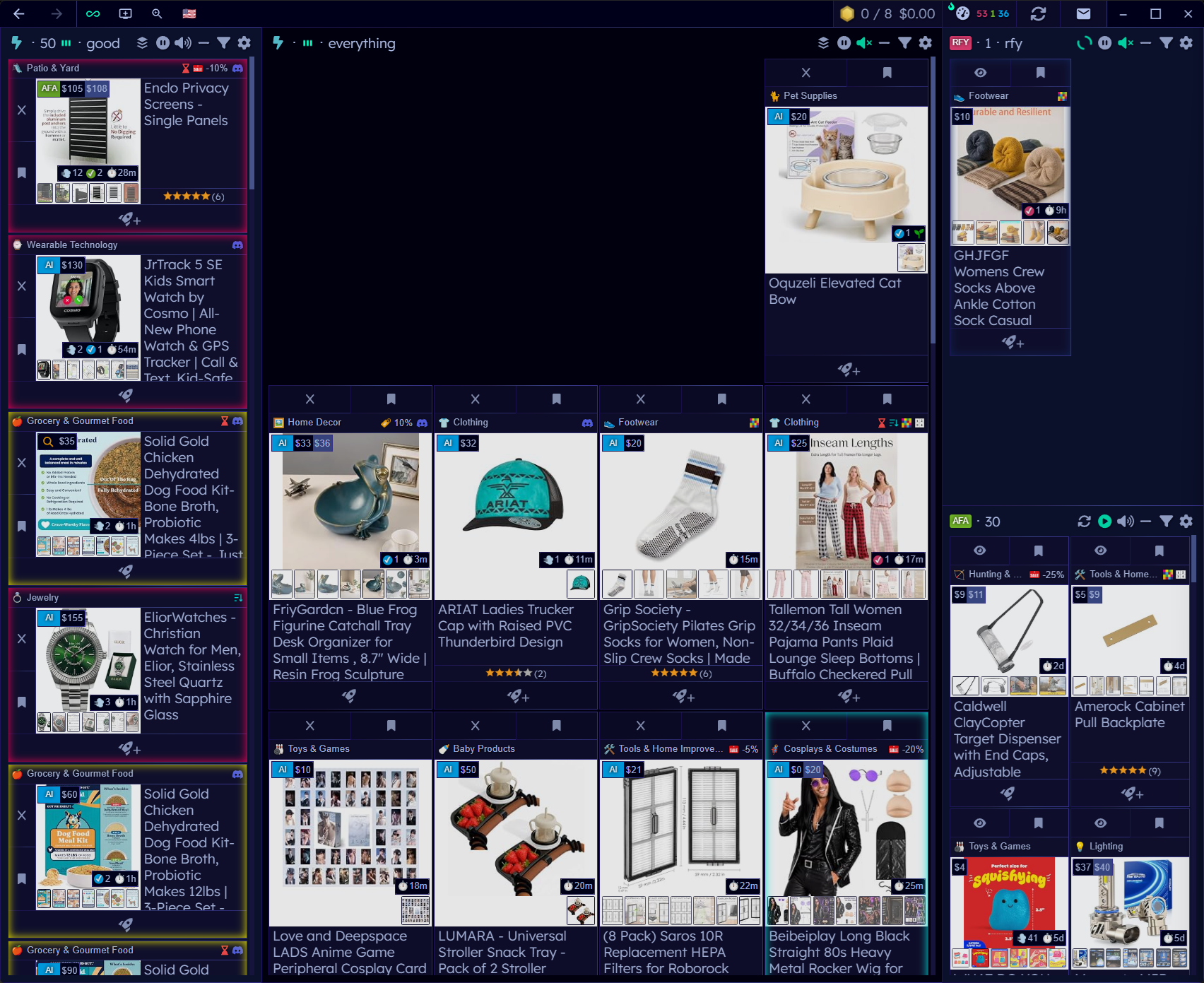
- Infinite Mode is available with integrated title bar widgets for the native apps. This hides the sidebar and also the top bar freeing more space on the interface.
- Refresh queues can now hide duplicate products (Ultimate), with the new "Auto-hide Duplicated Products" Behavior Setting enabled by default. The products are considered a duplicate when they have exactly the same image within the same page.
- The Infinite theme is now available, along with the Dark Romantic Theme by Elaira. The Ocean theme has also been redesigned.
- Design Settings now shows a visual indicator for the currently selected theme.
- Basic+, Turbo+, and Ultimate plan badge information is now available in Behavior Settings.
- A "Zelda chest" notification sound is now available as a rule option.
- The Settings page now includes a Sign Out of Amazon button.
- The main menu in the Sidebar now supports middle-click navigation.
- Products now fade in as they load, reducing flickering.
- Native apps now notify users when a new version needs to be installed.
- A new CAPTCHA handling page is available.
¶ Changes
- The Speedometer now hides countries with no currently available products.
- The transition when reloading after an Ultraviner update has been improved.
- Discord integration wording in Behavior Settings now reflects different account types.
¶ Fixed
- Resolved the famous error that could occur when failing to play sounds in the native app launchers for Windows/macOS/Linux.
- The pointer cursor has been removed from the Ultraviner logo in the Settings plan table.
- Duplicate version-update notifications no longer appear.
- AliExpress and Temu links are now only clickable within their intended hyperlink areas.
31 August 2026
5.0 ~ 5.6.15