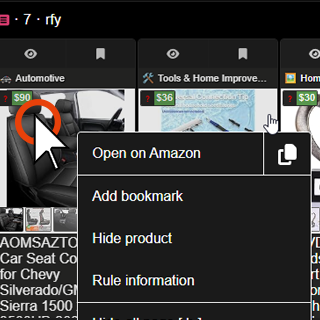
The context menu shows actions related to the selected product or queue.
¶ How to open
Right click (on mouse) or long press (on touchscreen) on a product to open the Context Menu. Over there you will find some options to interact with the product and queue.
¶ Actions
- Open on Amazon: Opens the product on Amazon
- Open on new tab: Opens the product in a new browser tab
- Share to chat: Shares the product to a chat room (see Sharing products)
- Add bookmark / Remove bookmark: Adds or removes the product from your bookmarks
- Assign to Category / Manage Categories (bookmarked products): Organizes your bookmarks into categories
- Clear All Bookmarks (Bookmark queue only): Removes all your bookmarks
- Hide product / Unhide product: Hides or shows the product in the queue
- Hide all page: Hide all products in the page
- Unhide all page: Unhide all products in the page
- Toggle Hidden Products: Show/Hide hidden products
- Share RFY Summary to Chat (RFY queue only): Shares a summary of your RFY products to chat
- Rule information: Displays which rules matched the product (sound, highlight, hide, blur)
- Test with alert rules: Shows which of your alert rules match the product
- Dismiss Alert (Alert queue only): Dismiss the selected product from view
- Dismiss Alert Page (Alert queue only): Dismiss all products in the displayed page
- Dismiss All Alerts (Alert queue only): Dismiss the entire list of products inside the alert queue
- Dismiss All Alerts From All Queues: Dismiss the products of every alert queue
- Dismiss Unavailable Products: Dismiss the products that are no longer available
- Toggle Pause on all queues: Pause/Resume auto-refresh on all queues
- Toggle Mute on all queues: Mute/Unmute all queues preventing rules from playing sounds
- Cancel: Close the menu