¶ Option 1: Android app:

¶ Option 2: Vivaldi + Violentmonkey
- Inside Vivaldi browser:
- Click on the main menu "..." > Extensions > Discover More Extensions
- Search extensions: "Violentmonkey"
- On the result list click on Violentmonkey.
- Inside the page, click on "Add to Vivaldi"
- It will ask "Add "Violentmonkey"? Click on Add extension.
- Click on the main menu "..." > Extensions > Manage Extensions
- On the top right, enable Developer mode
- On the list you will see Violentmonkey, click on Details
- Enable "Allow User Scripts"
- Open the UV url: https://ultraviner.com/dist/ultraviner.user.js
- Violentmonkey will ask if you would like to install Ultraviner script, click install and after that on close
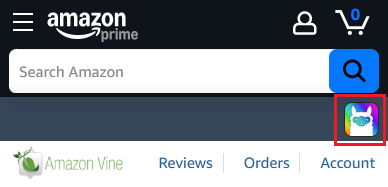
- Open vine website, you should have "Ultraviner" logo on the top of the main menu. Click on it to navigate to Ultraviner.
- Make sure that your website is in "Mobile mode" instead of "Desktop mode". Ultraviner was designed to be optimal on normal mobile mode.
If Amazon app or another browser or app is opening while you are trying to log in inside UV: temporarily disable or remove Amazon App or go inside Vivaldi settings > Privacy and Security > don't open links in external apps
To have a smaller interface footprint I recommend:
main menu > Settings > Tabs > Show Tab Bar (disabled)
main menu > Settings > Appearance & Theme >Show Navigation Bar (disabled)
¶ Option 3: Microsoft Edge + Tampermonkey
- Inside Microsoft Edge browser:
- Click on the main menu "..." > Extensions
- Search extensions: "Tampermonkey"
- On the result list click on "get"
- Check the box "You need to enable "Allow User Scripts" option to use this extension
- Click "Add"
- Go back to main menu "..." > Extensions and verify that Tampermonkey shows in the list
- Open the UV url: https://ultraviner.com/dist/ultraviner.user.js
- Tampermonkey will ask if you would like to install Ultraviner script, click install
- Open vine website, you should have "Ultraviner" logo on the top of the main menu. Click on it to navigate to Ultraviner.
- Make sure that your website is in "Mobile mode" instead of "Desktop mode". Ultraviner was designed to be optimal on normal mobile mode.
¶ Other Options
- Users reported that it also works with Yandex, Quetta and Ultimatum browsers.
¶ Extras
- Optionally, you can install Ultraviner as a Web App by on your homescreen by pressing the browser's menu option > "Add to home screen"


See also: What the Android app adds