- Install from Chrome Webstore:
- Open vine website, extension should prompt you to enable User Scripts access. After enabling, refresh the page.

- If not prompted, please ignore this step.
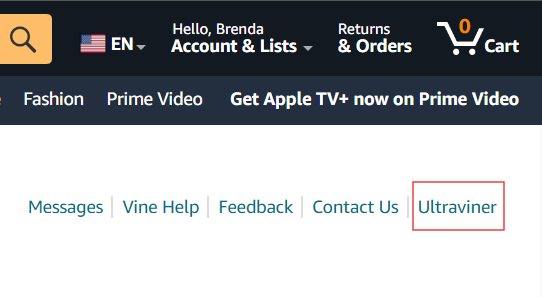
- You should have "Ultraviner" in the main menu, on the right side of "Contact US"
- Inside Chrome, click on "..." main menu > Extensions
- Inside extensions page, on the left, click on "Discover more extensions and themes on Chrome Web Store"
- Inside extension store, search for "Ultraviner"
- Click on "Amazon Vine Ultraviner"
- Click on "Add to Chrome"
- Chrome Web Store will present you an alert, click on "Add Extension"
- Open vine website, you should have "Ultraviner" in the main menu, on the right side of "Contact US"
- Open vine website, you should have "Ultraviner" in the main menu, on the right side of "Contact US"
- Inside Edge:
- Click on "..." main menu > "Extensions"
- Inside extensions page, on the bottom of the page click on "Get extensions for Microsoft Edge"
- Search for Ultraviner
- On the search results, click on "Amazon Vine Ultraviner"
- Click on "Get"
- Edge will present you an alert, click on "Add extension"
- Open vine website, you should have "Ultraviner" in the main menu, on the right side of "Contact US"
- Open mac App Store
- Search for Userscripts
- Click "get"
- Go To https://ultraviner.com/dist/ultraviner.user.js
- Copy the entire script text
- Open vine website,
- On the left of the address bar, click on the Userscripts icon "</>"
- Click on Always Allow on This Webste
- Click again on the Userscripts icon "</>"
- Click on "Open Extension Page"
- Click on "+" > New JS
- Paste the script copied
- On the bottom-right of the screen, click save
- Close Userscripts Tab
- Refresh Amazon Vine website, you should have "Ultraviner" in the main menu, on the right side of "Contact US"
- You can open the chrome webstore on any Chromium based browser to install (Edge, Opera, Brave, Vivaldi, etc)
- Open Chrome
- Inside, click on Main menu "..."
- Click on Extensions > enable "Developer Mode" checkbox
- Visit Chrome Web Store
- Search for Tampermonkey
- Click on "Add to Chrome"
- Click on the extensions menu (Puzzle icon)
- Verify that Tamermonkey is listed
- Open the UV url: https://ultraviner.com/dist/ultraviner.user.js
- Tampermonkey will ask if you would like to install, click install.
- In case previous step do not ask you to install:
- Click on main menu "..."
- Scroll down and click on "Tampermonekey"
- Inside Tampermonkey, click on "Dashboard"
- Go to tab "Utilities"
- At the bottom, Import from URL
- paste: https://ultraviner.com/dist/ultraviner.user.js and click install
- Open vine website, extension should prompt you to enable User Scripts access. After enabling, refresh the page.
- If not prompted, please ignore this step.
- You should have "Ultraviner" in the main menu, on the right side of "Contact US"
- Instructions are similar for any browser with Extensions or Tampermonkey, Greasemonkey, Violentmonkey, etc
 Open Chrome Webstore
 Open Edge Add-ons