Webhooks send your Ultraviner data to other apps and websites. For example, every order you place can be added to a Google Sheet, or every new RFY product can be posted to your own Discord channel.
Webhooks need the Ultimate plan.
Just want a notification on your phone? You don't need a webhook for that. Install the Ultraviner app on your phone and use Notifications (for example New RFY items), or turn on the 🔔 Push notification box on an Alert rule.
¶ Where to find them
Open Customize Webhooks in the left sidebar. The page has 3 tabs, one for each webhook type:
| Tab | Sent when | Variables you can use |
|---|---|---|
| Rule | A rule you picked matches a new product | Per product: asin, url, name, etv, image_url, image_base64, search_term, uv_url, android_url. Once per message: rule_id, rule_name |
| Order | You place an order with Ultraviner | order_id, asin, variation_asin, url, variation_url, name, etv, datetime, date, time, image_url, image_base64 |
| Order History | You open one of your Orders pages | Per order: order_id, asin, url, name, etv, datetime, date, time, image_url, image_base64 |
Write a variable between double curly brackets, like {{name}}. Dates and times are in UTC.
¶ Create a webhook
- Open Customize Webhooks and pick the tab (Rule, Order or Order History).
- Click Add Webhook. A webhook called "New Webhook" appears in the list.
- Click the ✏️ pencil to edit it.
- Fill in the fields (see below).
- Click Test to send sample data. A message tells you if it worked.
- Click Save.
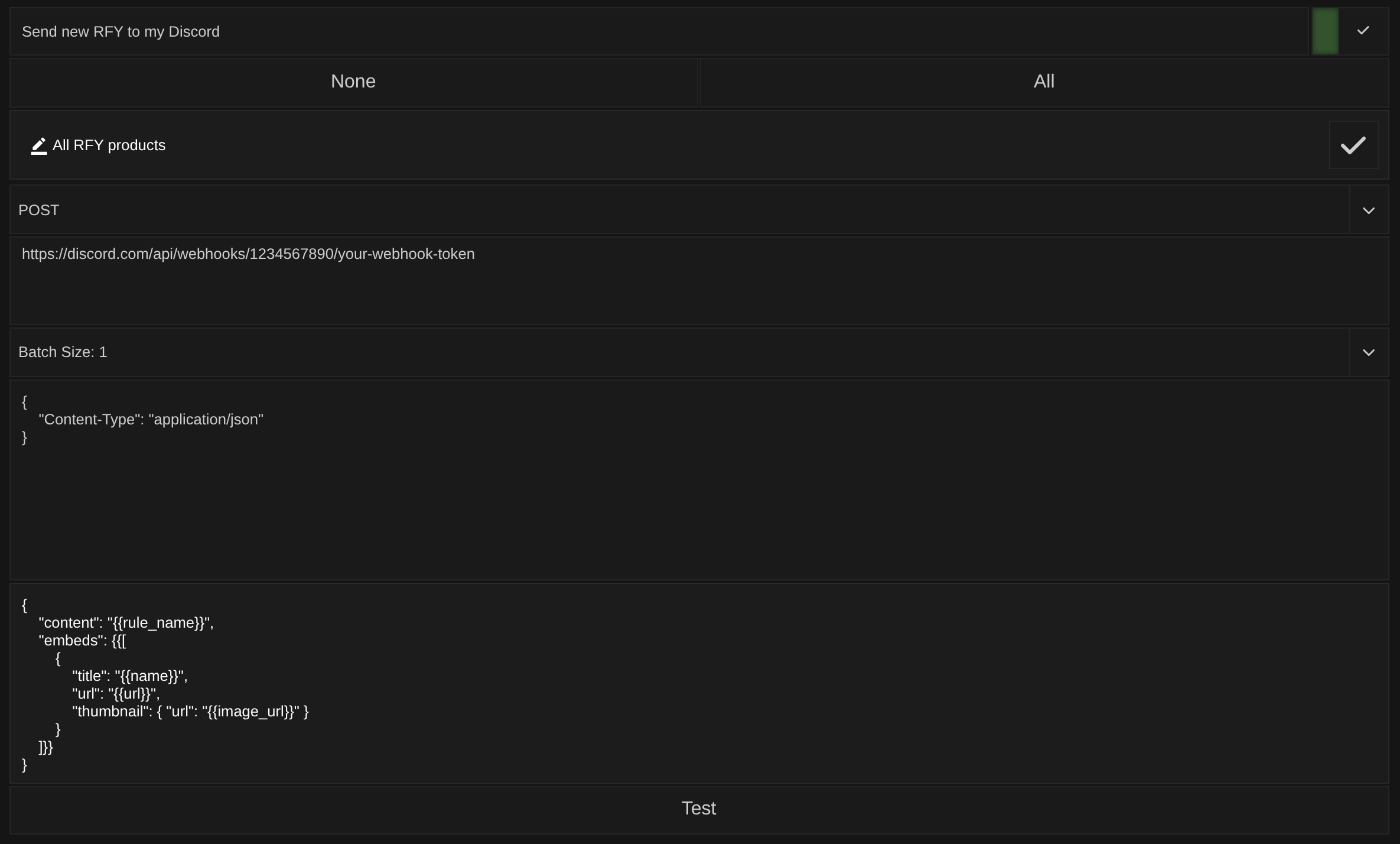
| Field | What to put there |
|---|---|
| Name | Any name you like. The switch on the right turns the webhook on or off. |
| Rules (Rule tab only) | Tick the rules that should send this webhook. All and None tick or untick every rule. |
| Method | What the other app asks for. Usually POST. Google Sheets uses GET. |
| Webhook URL | The address the other app gave you. It must start with https:// (or http://). |
| Batch Size | Rule and Order History tabs, only with POST/PUT/PATCH. How many products go in one message. Use 1 to send one message per product. |
| JSON Headers | Extra information for the other app, written as JSON. If you don't need any, use {"Content-Type": "application/json"}. |
| JSON Payload | The message itself, written as JSON. Only for POST/PUT/PATCH. |
¶ The product list block {{[ ... ]}}
A Rule or Order History webhook can carry many products in one message. Put the part that repeats for every product between {{[ and ]}}. Ultraviner turns it into a list with one entry per product:
{
    "rule_name": "{{rule_name}}",
    "products": {{[
        {
            "asin": "{{asin}}",
            "name": "{{name}}"
        }
    ]}}
}
With Batch Size 1 you can also use the product variables anywhere in the payload, without the block.
¶ Examples
¶ Post new RFY products to your own Discord channel
In Discord
- Create a Discord server (or use one you own) and a channel.
- Right-click the channel > Edit Channel > Integrations > Create Webhook (or Webhooks > New Webhook).
- Click Copy Webhook URL.
In Ultraviner
- Go to Customize Rules, open the Refresh Rule tab and create a rule that matches your RFY products, for example
Field "Queue Type" Equal "Recommended for You". Save it. - Go to Customize Webhooks > Rule tab > Add Webhook, then click the ✏️ pencil.
- Tick the rule you just created.
- Method: POST. Webhook URL: paste the Discord URL. Batch Size: 1.
- JSON Headers:
{
    "Content-Type": "application/json"
}
- JSON Payload:
{
    "content": "{{rule_name}}",
    "embeds": {{[
        {
            "title": "{{name}}",
            "url": "{{url}}",
            "thumbnail": { "url": "{{image_url}}" }
        }
    ]}}
}
- Click Test. A test product should appear in your Discord channel. Then click Save.

¶ Push notification to your phone with ntfy
The easiest way to get phone notifications is the Ultraviner app (see the green box at the top). Use ntfy only if you prefer it. ntfy is not reliable on iPhone and iPad.
On your phone
- Install the ntfy app from the Google Play Store.
- On Android, turn off battery optimization for ntfy so alerts arrive right away.
- In the app, go to Settings > Connection protocol and choose WebSockets.
- Tap + to add a topic. Use a long random name that nobody can guess, for example
16e5efed-b94d-4038-9bdd-7bcc26a09a57(a GUID generator makes one for you). - Tick Use another server, enter
https://ntfy.ultraviner.comand tap Subscribe.
In Ultraviner
- Create the rule that should notify you:
- New RFY products: a Refresh Rule such as
Field "Queue Type" Equal "Recommended for You". - AFA/AI products from the Alert queue: an Alert Rule, for example
Field "Title" Regex Match ".*"to match everything. Only do this in countries without a lot of alerts.
- New RFY products: a Refresh Rule such as
- Go to Customize Webhooks > Rule tab > Add Webhook and click the ✏️ pencil.
- Tick your rule. Method: POST. Webhook URL:
https://ntfy.ultraviner.com/. Batch Size: 1. - JSON Headers:
{
    "Content-Type": "application/json"
}
- JSON Payload (replace the topic with your own):
{
    "topic": "16e5efed-b94d-4038-9bdd-7bcc26a09a57",
    "title": "New product",
    "message": "{{asin}} - {{name}}",
    "tags": ["warning"],
    "priority": 4,
    "attach": "{{image_url}}",
    "actions": [
        {
            "action": "view",
            "label": "Open",
            "url": "{{uv_url}}"
        }
    ]
}
{{uv_url}} opens the product in Ultraviner. For RFY you can use https://www.amazon.com/vine/vine-items?ultraviner instead.
- Click Test, then Save.
¶ Add your orders to a Google Sheet
In Google Sheets
- Open (or create) a sheet at drive.google.com and add a new tab for your orders.
- Click Extensions > Add-ons > Get add-ons, search for "Webhooks" and install Webhooks for Sheets.
- Open the add-on from the right sidebar (black and red icon). If you don't see the sidebar, click the small arrow at the bottom right of the screen.
- Follow the add-on's steps. At the end it shows an astronaut picture with your webhook URL under it. It looks like
https://script.google.com/macros/s/xxxxx/exec?gid=yyyyyyyyy.

In Ultraviner
- Go to Customize Webhooks > Order tab > Add Webhook and click the ✏️ pencil.
- Method: GET.
- Webhook URL: your add-on URL followed by the order details:
https://script.google.com/macros/s/xxxxx/exec?gid=yyyyyyyyy&order={{order_id}}&asin={{asin}}&name={{name}}&etv={{etv}}&date={{date}}&image_url={{image_url}}
- JSON Headers:
{}
- Click Test. A test row should appear in your sheet. Then click Save.
From now on, every order you place with Ultraviner is added to the sheet.
The first row of the sheet holds the column names, and they must match the names in the URL (
order,asin,name,etv,date,image_url). On an empty sheet this row is created for you.
¶ Good to know
- Webhooks are sent by Ultraviner on your own computer or phone, not by our server. The device has to be on and running Ultraviner.
- You can turn each webhook type on or off per device in Settings > Behavior > Webhooks (Rule Webhooks, Order Webhooks, Order History Webhooks). They are on by default.
- A Rule webhook sends each product only once per device. Hidden products are not sent.
- Products shared on Discord (Alerts from Brenda) don't send Rule webhooks. When a device comes back online, only alerts from the last 10 minutes are sent.
- Order History webhooks send the orders again every time you open an Orders page.
¶ Troubleshooting
If a Rule webhook doesn't send anything:
- Open the webhook and click Test. If the test fails, check the URL, headers and payload. Headers and payload must be valid JSON.
- Make sure the webhook is switched on and the right rules are ticked.
- Make sure Settings > Behavior > Webhooks > Rule Webhooks is on, on the device that should send it.
- For RFY: the device must show your RFY queue and have its auto refresh on.
- Right-click a product that should have been sent and choose Rule information to check that your rule matches it.
- Go to Settings > Tools > Export Webhook Product cache. The file lists the products already sent and whether sending worked.
- To send products again, use Settings > Tools > Purge Webhook Product cache.