A screen is a saved dashboard: its own set of queues, their order and their layout. With several screens you can keep, for example, one screen for RFY/AFA/AI hunting, one for searches and one for chat and bookmarks, and switch between them in one click.
¶ Turning screens on
Go to Settings > Behavior > Dashboard and turn on Multiple Screens. With it off, Ultraviner uses a single screen.
¶ Switching screens
Use the screen button on the queue bar: it lists your screens, so pick one to switch. The same menu has a link to edit your screens.
¶ Creating and editing screens
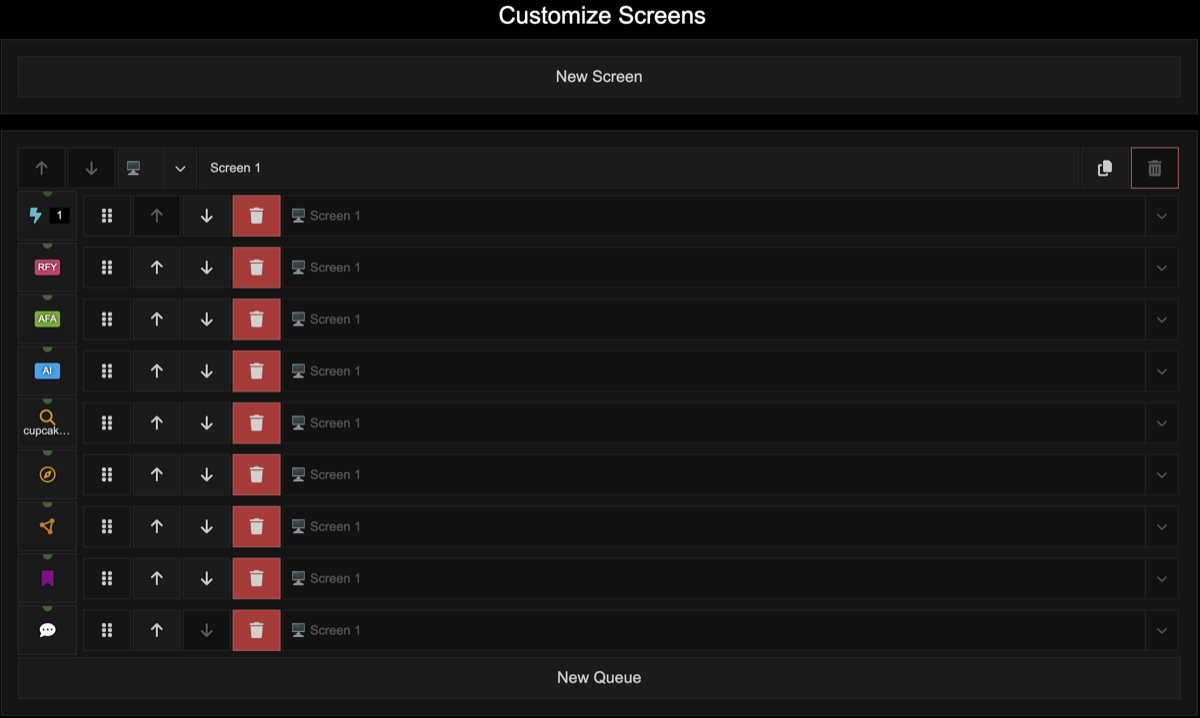
Open Customize Screens (from the screen button, or the sidebar). There you can:
- Add a new screen with New Screen, or clone an existing one with all its queues.
- Rename a screen.
- Reorder screens and the queues inside each screen, with the ⠿ drag handle or the arrows.
- Delete a screen or a queue. The last screen can't be deleted.
¶ Settings
| Setting | Where | What it does |
|---|---|---|
| Multiple Screens | Behavior > Dashboard | Lets you create more than one screen |
| Default Screen | Behavior > Dashboard | The screen shown when Ultraviner starts |
| Reload on Toggle | Behavior > Dashboard | Reloads a queue when you switch to its screen |
| Sync Screens | Behavior > Connectivity | Keeps your screens the same on all your devices (Ultimate) |